


Jumping on a video call has now become a regular experience for millions of people, but successful and rewarding remote meetings don’t just happen by chance.
Manufacturer Boom Collaboration has been engaging with customers around the world to pinpoint some of the many secrets of success and the top pitfalls to avoid.
At Boom, they’ve seen it all. From the tiny camera in a massive boardroom to the spaghetti mess of cables nobody dares touch. So they’ve developed a list of the Top 10 mistakes seen again and again – and how to fix them.
1 – Overcomplicating the Set-up
Complicated systems discourage use, increase support resource, and create failure points. Keep it plug-and-play where possible – ideally with a one-cable Bring Your Own Meeting (BYOM) set-up.
2 – Not Matching Equipment to Room Size
Using a huddle room camera or even a videobar in a big boardroom leads to poor framing, and audio issues. Choose equipment (camera field of view, mic pick-up, speaker range) that fits the room.
3 – Running Too Many Devices Through USB Without a Hub
Laptops have limited USB bandwidth. Multiple AV devices can cause dropouts or incompatibility. Use a dedicated conferencing hub to manage multiple connections reliably.
4 – Using Passive Cables for Long USB Runs
USB signals degrade over distance. Passive cables over 5m often cause intermittent or total failure. Use active USB extenders or solutions like USB over IP.
5 – Forgetting About Cable Management
Dangling cables create a mess, trip hazards, and poor reliability. Plan cable routing in advance and use hubs or wall plates for tidy, permanent installs.
Use Biohacking to Beat Burnout

Reflection and recovery is crucial to a healthy psyche and body. Everyone struggles with this balance, from part time hustler to CEO of a multinational corporation. I can speak from … Continue reading
6 – Using Built-In Laptop Mics and Cameras
Built-in components often deliver poor audio and video quality, especially in group settings. Use an external camera and speakerphone or video bar designed for conferencing.
7 – Ignoring Room Acoustics and Lighting
Even the best hardware struggles in echo affected rooms or poorly lit spaces. Use soft furnishings to reduce issues and ensure faces are well-lit (ideally with natural or front-facing light).
8 – Using Consumer Gear for Professional Meetings
Devices made for gaming or casual chats often lack features like beamforming mics, noise cancellation, or PTZ controls. Invest in purpose-built conferencing gear suitable for the room size.
9 – Not Updating Firmware
Outdated firmware can cause compatibility issues, bugs, or performance degradation. Regularly check for and apply firmware updates for all conferencing gear.
10 – Skipping Device Testing Before Meetings
Nothing kills a meeting faster than troubleshooting a camera or mic last minute. Test audio/video devices before important calls and schedule regular system checks.
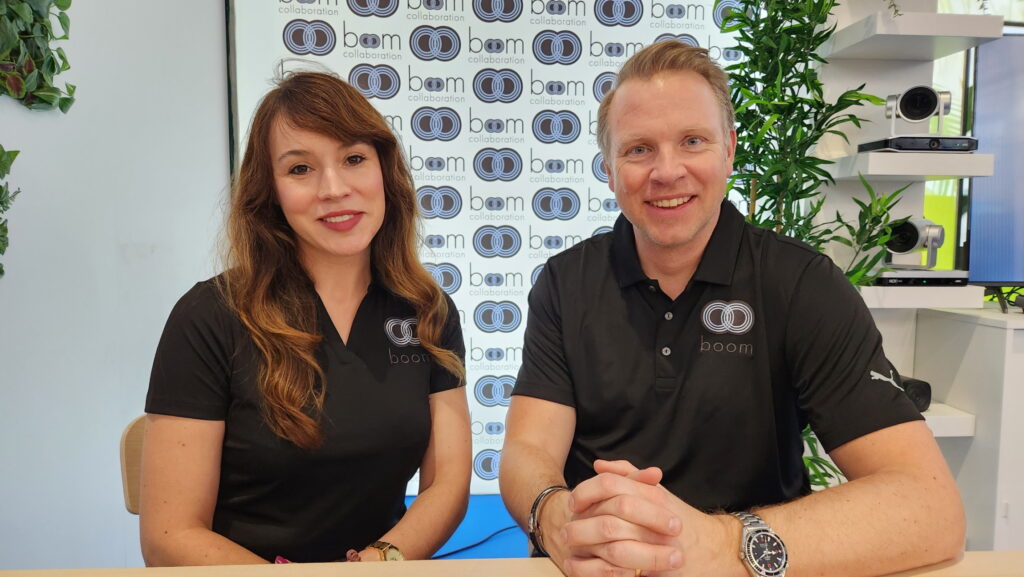
Boom was born by founders Fredrik Hörnkvist and Holli Hulett, who have a natural love for collaboration and a strong desire to address both current and future video conferencing trends, through an agile organization that brings innovation to today’s dynamic and diverse meeting room spaces.
Texas-based Boom offers the complete array of conferencing solutions, from dedicated kits to videobars, multi-camera controllers, in-room systems and cutting edge connectivity.
Co-Founder Fredrik Hörnkvist says the world of conferencing continues to evolve but many fundamentals remain the same. “Video conferencing is second nature to most of us now, but great remote meetings don’t happen by accident!”
“I think there are many different components that need to be brought together to create the ultimate collaboration experience – from furniture and room ambiance to technology itself and the impact of AI,” said Hörnkvist. “Keep things simple, reliable and engaging – as using high quality equipment will always produce the optimum results.”
“It’s about doing your homework first,” added fellow Founder Holli Hulett. “What room size, how many people will be present and what are they using the room for? For us the best advice is demo, demo, demo! Product demonstrations are the best way to capture new sales and show customers just how good today’s video conferencing systems can be. Set up online meetings and show different cameras, with support from a manufacturer such as Boom. Seeing is believing!”